Top 5 Tips for Effective AI 3D Rendering Techniques?
In the rapidly evolving digital landscape, AI 3D rendering is shaping the way we visualize our ideas. As technology advances, mastering effective AI 3D rendering techniques becomes essential for designers and artists alike. High-quality visuals can engage audiences and enhance communication, making it vital to understand the nuances of this powerful tool.
Creating stunning 3D visuals isn't always straightforward. Many face challenges like over-reliance on software capabilities. Effective rendering requires a blend of creativity and technical expertise. Small adjustments can lead to significant improvements. Experimentation is critical, as some results may surprise you or fall short of expectations.
Understanding the fundamentals of light, texture, and composition is crucial for exceptional AI 3D rendering. Flawless execution is rare, and recognizing that imperfection can sometimes spark innovation is important. This guide will delve into top tips that enhance your rendering process while reflecting on the inevitable bumps along the way.

Understanding the Basics of AI 3D Rendering Techniques
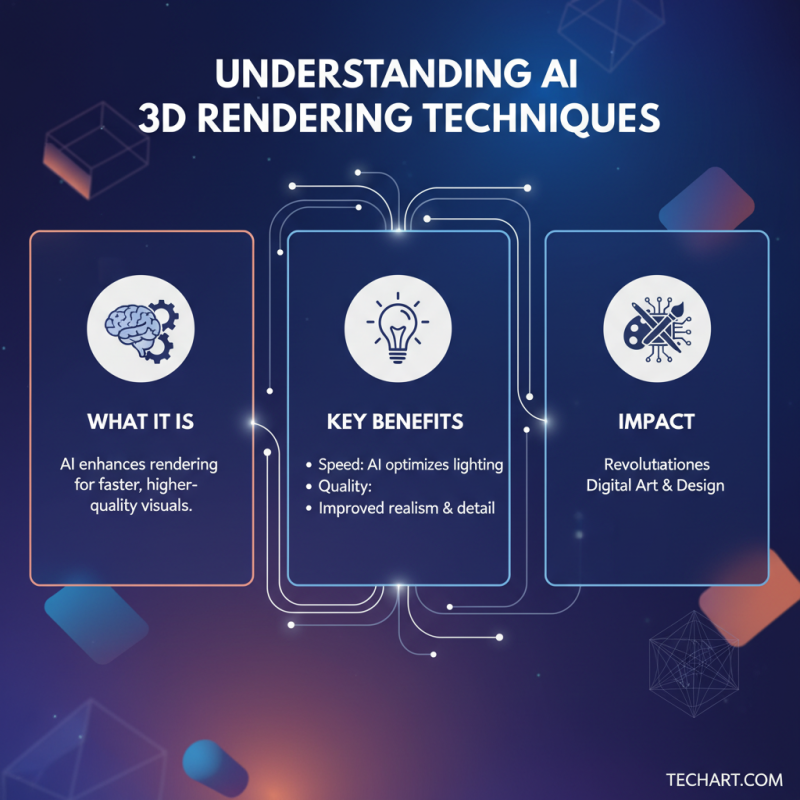
AI 3D rendering techniques are revolutionizing the field of digital art and design. Understanding these techniques can help artists and designers create stunning visuals. The essence lies in employing artificial intelligence to enhance rendering processes. This includes both speed and quality improvements. For instance, AI can predict and optimize light settings, saving time for artists.
Familiarizing oneself with common AI algorithms is essential. Techniques such as ray tracing or neural rendering provide a foundation. They help in creating realistic textures and lighting effects. Each approach has its strengths and weaknesses. Artists may find it challenging to balance detail with efficiency. Experimentation is key. Iterating on different settings allows for discovering unique outcomes.
It’s important to remember that not every rendering will turn out perfect. Some images may require a second or third attempt. Learning from these failures fosters growth. Engaging with AI tools will yield better results over time. Building experience in this area leads to a deeper understanding of the intricate balance between technology and creativity.
Choosing the Right Software for AI-Driven 3D Rendering
When it comes to AI-driven 3D rendering, selecting the right software is crucial. There are numerous options available today, each with unique features. Some tools excel in realism, while others prioritize speed. Understanding your project’s requirements is key. This ensures that you pick a platform tailored to your specific needs.
Consider the learning curve. Many advanced software packages demand time to master. If you're a beginner, an intuitive interface might serve you better. It’s not uncommon for users to dive into complex tools, only to feel overwhelmed later. Furthermore, check for community support. Software with active communities can provide essential resources and troubleshooting help. This support enhances your learning experience and ensures smoother workflow.
Don't overlook compatibility with your hardware. Some software demands high system specifications, limiting accessibility. Additionally, evaluate the cost. Free trials are often a wise choice. They allow you to test software before committing. This can prevent buyer’s remorse and help refine your decision-making process. Ultimately, the goal is to find software that fosters creativity and minimizes frustration.
Optimizing Models for Enhanced AI Rendering Performance
In the realm of AI 3D rendering, optimizing models is crucial for performance. Effective model optimization can reduce rendering time by up to 50%, according to a report by the International Association of 3D Graphics. Lowering polygon counts while maintaining detail is essential. Use techniques such as Level of Detail (LOD) to ensure your scenes are manageable without sacrificing quality. This approach allows for dynamic adjustments based on camera distance, thereby improving efficiency.
Texture management is another vital aspect. High-resolution textures can increase render times significantly. Observations from industry studies indicate that using optimized textures can yield up to a 30% performance boost. Consider compressing textures without losing clarity. Utilizing mipmaps can make rendering faster by reducing the workload on the GPU when textures are viewed at a distance.
However, not all models will benefit equally from standard optimization methods. Each project presents unique challenges. It's crucial to analyze the specifics of your scene. Some models may require more intricate details for realism, complicating the optimization process. Adjusting parameters on a case-by-case basis can lead to a balance between quality and performance. Assessing these trade-offs is a continuous learning process in the evolving field of AI rendering.
Top 5 Tips for Effective AI 3D Rendering Techniques
This bar chart illustrates the impact of various factors on rendering performance in AI 3D rendering, rated on a scale of 1 to 10. Understanding these factors can help optimize models effectively.
Incorporating Realistic Textures and Lighting Effects
Creating realistic 3D renderings requires a keen eye for textures and lighting. Textures add depth and realism to your models. When choosing textures, consider their resolution and how they interact with light. High-quality textures can enhance the overall effect.
One tip is to use layered materials. This approach allows you to blend various textures seamlessly. For instance, combine a rough surface with a subtle sheen to mimic natural materials, like wood or stone. This adds a tactile quality that viewers can almost feel.
Lighting is equally crucial. Experiment with different sources and angles. Natural light can create an inviting atmosphere. Conversely, artificial lighting can enhance mood and focus. Adjust intensity and color temperature for realistic effects. Remember, shadows can tell a story too. Deep shadows can create drama, while soft lighting instills calm. Achieving perfect lighting is challenging, requiring patience and multiple trials. Embrace imperfections as they can lead to unexpected, yet stunning results.
Utilizing AI-Assisted Tools for Faster Rendering Workflows
AI-assisted tools have transformed the landscape of 3D rendering. These technologies allow artists and designers to speed up workflows and enhance creativity. By leveraging machine learning, users can quickly generate complex textures and lighting effects. This leads to a more efficient rendering process and ultimately, better results.
Integrating AI tools into your workflow is vital. These applications can automate repetitive tasks, making room for your creative input. However, they are not perfect and can sometimes produce unexpected outputs. Thoroughly testing these tools will inform you on their limits and capabilities.
Additionally, maintaining a balance between automated processes and artistic vision is essential.
With AI at your disposal, you can explore different styles and techniques without starting from scratch. Yet, it's crucial to remain critical of the results. This not only fosters growth but also ensures your projects maintain a unique touch. Embrace the challenges that come with these advancements, and use them to refine your skills in 3D rendering.