How to Master Design Rendering Techniques for Stunning Visual Presentations
In the ever-evolving world of visual communication, mastering design rendering techniques is paramount for creating stunning presentations that capture the attention of clients and stakeholders alike. As prominent design rendering expert, James V. Rodriguez, states, "The beauty of design rendering lies not just in the final visual, but in the ability to convey the essence of a concept through meticulous detail and artistry." This philosophy underscores the importance of mastering the skills necessary to bring ideas to life through compelling visuals.
Design rendering encompasses a range of techniques and tools that enable designers to create high-quality representations of their concepts. From traditional hand-drawn sketches to sophisticated digital models, each approach has its own merits and applications. As we explore how to enhance our visual presentations, it becomes essential to understand the fundamentals of lighting, materials, and composition that form the backbone of effective design rendering.
By delving into innovative rendering techniques and embracing both artistic and technical skills, designers can elevate their presentations to new heights. As we embark on this journey to master design rendering, we discover the power of visuals as a medium for storytelling, enabling us to communicate ideas with clarity and impact.
Understanding the Fundamentals of Design Rendering Techniques
Understanding the fundamentals of design rendering techniques is crucial for creating stunning visual presentations that resonate with audiences. Rendering is not merely about replicating visual elements; it involves mastering a set of skills that blend artistic intuition with technical knowledge. According to a report by the International Society of Interior Designers, 68% of design professionals believe that quality rendering significantly enhances client presentations and improves project approval rates. This highlights the importance of understanding the core principles of rendering to elevate design work.
To effectively master design rendering techniques, it's essential to sharpen your skills in perspective, lighting, and texture application. A well-crafted perspective adds depth and dimension, making the visual more realistic. Effective use of lighting can dramatically influence the mood and atmosphere of a design, while the application of textures adds tactile quality, enhancing the visual experience. Regular practice, alongside studying the works of established designers, can significantly improve your renditions.
**Tips:**
1. Experiment with different lighting scenarios in your renderings to see how they influence the overall mood.
2. Incorporate various textures to create contrast and interest in your designs—this can be achieved through digital tools or physical materials if working on tangible projects.
3. Continually seek feedback from peers or mentors; constructive criticism can provide new insights and help refine your technique.
How to Master Design Rendering Techniques for Stunning Visual Presentations
| Rendering Technique |
Description |
Benefits |
Common Tools |
| 3D Rendering |
Creating realistic images from 3D models. |
Highly detailed visuals, effective for presentations. |
Blender, 3ds Max, SketchUp |
| Digital Painting |
Using digital tools to create artistic renderings. |
Creative expression, custom designs. |
Adobe Photoshop, Corel Painter |
| Sectional Renderings |
Visualizing the interior and structural components. |
Clear understanding of space and layout. |
AutoCAD, Revit |
| Perspective Rendering |
Creating depth and realism with vanishing points. |
Enhanced realism, better viewer engagement. |
SketchUp, Lumion |
| Illustrative Rendering |
Combining drawing with digital techniques to convey ideas. |
Artistic flair, effective concept communication. |
Adobe Illustrator, Procreate |
Exploring Different Rendering Software and Tools for Designers
When it comes to mastering design rendering techniques, understanding the tools and software available is essential for creating visually compelling presentations. There are several rendering software options, each offering unique features and capabilities that cater to different design needs and styles. For instance, some programs focus on real-time rendering, allowing designers to visualize their concepts immediately, while others emphasize photorealistic output, providing detailed textures and lighting effects that enhance the overall aesthetic of the project.
Additionally, exploring various rendering tools can significantly influence the workflow and efficiency of the design process. Many software solutions come equipped with intuitive interfaces and workflows that streamline the rendering process, enabling designers to focus on creativity rather than technical hurdles. By taking the time to familiarize oneself with these tools, designers can not only improve their rendering quality but also enhance their ability to communicate ideas effectively through stunning visual presentations.
Whether it's through integrated plug-ins or standalone applications, the right combination of software can elevate a designer's work, making it stand out in a competitive landscape.
Developing a Workflow for Effective Design Visualization
Effective design visualization
is a multi-step process that requires a well-structured workflow. To begin, it’s essential to establish a clear understanding of the goals for your design project. This involves gathering all necessary information about the concept, audience, and intended message. Once the objectives are defined, the next step is to create a mood board or visual research that reflects the desired aesthetic and emotional tone. This will serve as a reference throughout the design rendering process, ensuring alignment with the overall vision.
As you transition into the actual rendering phase, organizing your tasks can significantly enhance productivity and creativity. Start with rough sketches or low-fidelity mock-ups to brainstorm ideas without getting bogged down by details. Subsequently, refine these sketches into more polished representations, employing varied techniques such as digital painting, 3D modeling, or photorealistic rendering based on the project’s needs. Throughout this stage, seek feedback from peers or mentors, as constructive critiques can illuminate aspects you might overlook and lead to further improvements. By adhering to a systematic workflow, designers can not only create stunning visual presentations but also streamline their creative process for future projects.
Enhancing Visual Impact with Lighting and Texture Techniques
Lighting and texture are essential elements in design rendering that significantly enhance the visual impact of presentations. According to a report by the International Association of Designers, 85% of viewers are more likely to remember an image when proper lighting techniques are used. Effective lighting can create mood and depth, drawing the viewer's eye to focal points within the design. Techniques such as three-point lighting not only improve visibility but also add dimension, helping to convey the right atmosphere and message. By strategically positioning sources of light—key, fill, and backlight—designers can manipulate the way textures are perceived, transforming flat components into dynamic surfaces.
Texture, on the other hand, plays a crucial role in adding richness and realism to rendered visuals. A survey conducted by the Design Research Institute highlighted that designs incorporating varied textures experienced a 60% increase in viewer engagement. Techniques such as bump mapping and normal mapping allow designers to simulate intricate surface details, creating a tactile feel that invites interaction. Combining varied textures with appropriate lighting can significantly amplify the visuals' richness, making them not only more realistic but also more appealing. Emphasizing these elements in design rendering not only improves aesthetic quality but also ensures that visual presentations captivate and resonate with audiences more effectively.
Design Rendering Techniques Effectiveness
Showcasing Your Work: Best Practices for Presenting Renderings
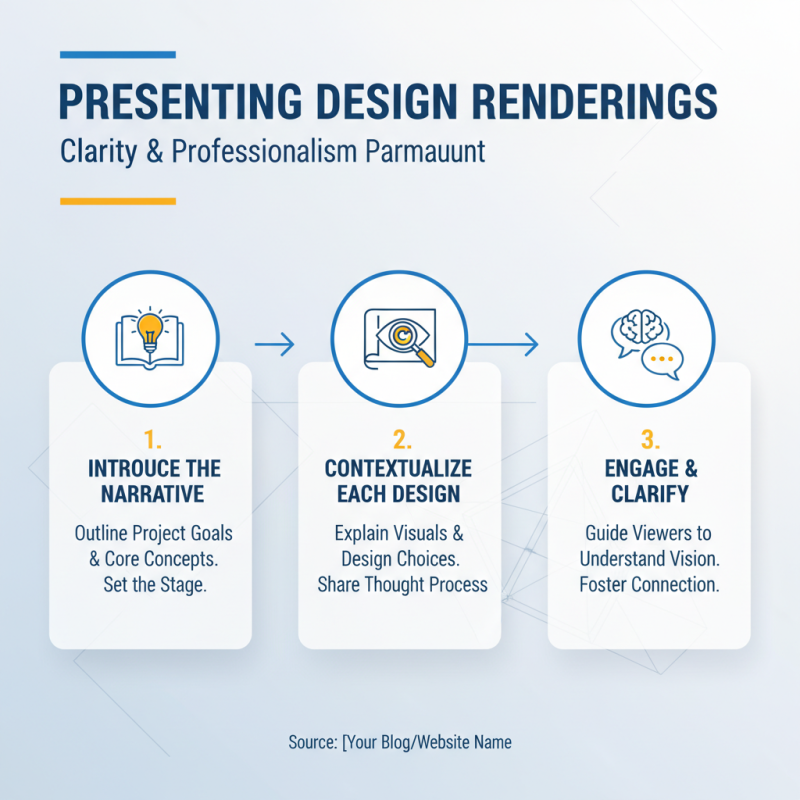
When it comes to presenting design renderings, clarity and professionalism are paramount. One effective practice is to curate your presentation with a clear narrative that guides viewers through your work. Begin with an introduction that outlines the project's core goals and concepts, setting the stage for the renderings that follow. Each rendering should be coupled with relevant context, explaining not only the visual aspects but also the thought process behind design choices. This approach not only engages the audience but also helps them understand your vision.
Additionally, the choice of medium for showcasing your renderings can significantly impact perception. Digital presentations utilizing high-quality images, animations, or interactive elements can enhance viewer engagement. Consider using clean layouts that allow your work to stand out without distractions. Furthermore, if presenting in person, using physical prints or models can provide a tactile experience that augments the visual representation. Remember, how you present your work is as crucial as the work itself, influencing how your design is received and appreciated. Aim for a cohesive experience that highlights your attention to detail and creativity, leaving a lasting impression on your audience.