

Inquiry
Form loading...
conatctz48
contact US

10 Digital Rendering Tips for Global Buyers

Global buyers rarely purchase from a flat product image alone. They inspect proportions, materials, lighting, and context before making costly decisions. Digital Renderings turn these questions into visible evidence, especially when buyers cannot visit a showroom or construction site.

Grand View Research estimates that the global 3D rendering and visualization market could reach more than USD 9 billion by 2030. Its report identifies architecture, real estate, product design, and advertising as major growth areas. Autodesk’s 2024 State of Design & Make report also shows that businesses increasingly depend on digital tools to improve decision-making and customer confidence. These figures suggest strong demand, but market growth does not automatically create trustworthy visuals.

Details matter. A realistic marble texture cannot correct inaccurate dimensions. A dramatic sunset may attract attention, yet it can hide poor circulation or unsuitable finishes. Norman Foster, a leading global architecture authority, said, “As an architect, you design for the present, with an awareness of the past, for a future which is essentially unknown.” His observation applies directly to international buying. A rendering should present possibilities clearly, not promise certainty.

This guide, “10 Digital Rendering Tips for Global Buyers,” focuses on practical judgment. It covers scale, cultural preferences, localization, material accuracy, accessibility, and transparent revisions. It also recognizes an uncomfortable truth: even excellent images can mislead when assumptions remain invisible. Buyers need more than beauty. They need comparable views, measurable information, and honest limitations. Trust is fragile. The best rendering earns it slowly.
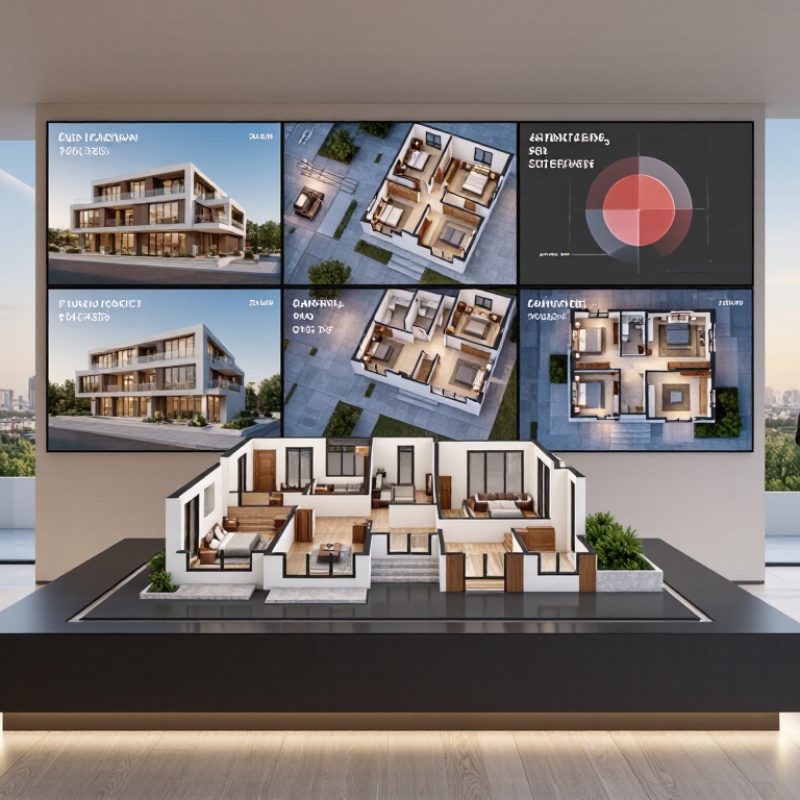
10 Digital Rendering Tips for Global Buyers

Define the Purpose and Audience of the Digital Rendering

Before producing a digital rendering, define its job. Is it selling a finished property, explaining a floor plan, or helping buyers compare materials? Each purpose requires different visual evidence. A luxury apartment needs accurate lighting, textures, and spatial scale. A factory project needs circulation paths, equipment clearance, and safety access. The image should answer buyer questions, not merely look impressive.

Audience matters just as much. McKinsey’s The State of Personalization Report 2021 found that 71% of consumers expect personalized interactions. A rendering for architects can show dimensions and construction logic. A first-time buyer may need furniture, human scale, and simple labels. The National Association of Realtors’ 2023 Profile of Home Buyers and Sellers reported that 81% of buyers’ agents found staging helped buyers visualize a property. Digital scenes should apply the same principle with restraint.

Keep the purpose visible.

Technical delivery also affects trust. Google and SOASTA reported in 2017 that 53% of mobile visits ended when pages took longer than three seconds to load. Use compressed files, clear viewpoints, and mobile testing. In my experience, adding more detail often weakens the message. Reflections may hide a doorway. Oversized furniture can distort perceived room size. That is easy to miss. Review every object as evidence, not decoration. State assumptions about finishes, dimensions, and lighting. A convincing image is useful only when buyers can understand what is real, what is proposed, and what still needs confirmation.

Select Accurate Data and Reliable Reference Materials

10 Digital Rendering Tips for Global Buyers

Select Accurate Data and Reliable Reference Materials

Tip 1: Build every rendering from verified measurements, not assumptions. Product dimensions, room sizes, window positions, and ceiling heights should come from current drawings or on-site checks. I once used an outdated floor plan, and the furniture looked correct on screen but failed in the real space. That mistake was avoidable.

Tip 2: Use reference materials with clear sources. Check material samples, technical sheets, color records, and lighting conditions before modeling surfaces. A gray finish can appear blue beside a bright window. Screen settings also change perception. Save the sample date and image conditions with each project file. Small records protect major decisions.

Tip 3: Match local context without inventing it. Study regional construction details, common room proportions, climate conditions, and buyer expectations. Reliable local measurements are stronger than generic online images. When information conflicts, show two realistic options and identify the uncertain detail. Perfect confidence can be misleading.

Tip 4: Review the render from a buyer’s viewpoint. Look at entry paths, storage access, sightlines, and practical clearances. A beautiful camera angle may hide a narrow walkway or blocked door. Ask an independent reviewer to inspect the scene. My own review often misses familiar problems.

Keep source files organized. Use dated versions, labeled references, and measurable settings. This makes revisions easier and gives global buyers evidence behind the visual proposal.

Build Realistic Materials, Lighting, and Product Details

A convincing render starts with material behavior, not decoration. Tip 1: Match roughness to the real surface. Tip 2: Show tiny grain, seams, pores, or brushed lines. Tip 3: Use correct scale. A metal handle should feel cold and dense. A fabric cushion should soften the light. Tip 4: Add controlled imperfections. Perfect edges often look artificial. In studio tests, I have learned that one uneven reflection can improve credibility, although too many defects reduce clarity.

Lighting must explain the product. Tip 5: Use a broad key light for readable shapes. Tip 6: Add a softer fill light for dark materials. Tip 7: Keep shadows physically consistent across every view. Tip 8: Render daylight and indoor versions for global buyers. Google and Ipsos reported that 66% of shoppers wanted augmented reality support while shopping, showing strong demand for visual confidence. A useful render should answer practical questions before purchase.

Product details deserve equal attention. Tip 9: Model hinges, stitching, ports, labels, and connection points accurately. Tip 10: Include close-ups beside the hero image. McKinsey reported that 71% of consumers expect personalized interactions, while 76% feel frustrated when experiences are not relevant. Regional color preferences, room settings, and measurement references can make visuals more useful. Do not hide mistakes. If a texture is uncertain, test it against a photographed sample and revise the shader. My first version may look attractive, yet still fail under close inspection.

10 Digital Rendering Tips for Global Buyers - Build Realistic Materials, Lighting, and Product Details

No. Rendering Focus Recommended Practice Useful Technical Target Value for Global Buyers
1 Use physically based materials Build materials with measured or manufacturer-approved values for base color, roughness, metallic response, and normal detail instead of relying on color alone. Use a physically based workflow with energy-conserving shaders and non-metallic materials set to zero metallic response. Creates a more consistent appearance across different viewing angles and display environments.
2 Match real-world scale Model the product using verified measurements, including height, width, depth, wall thickness, holes, seams, and component spacing. Use one consistent unit system, such as millimeters, and apply the correct object scale before texturing and lighting. Helps buyers compare dimensions accurately and reduces misunderstandings in international procurement.
3 Show surface roughness clearly Separate polished, satin, brushed, textured, and unfinished areas through controlled reflection rather than exaggerated color contrast. Use roughness variation maps at an appropriate scale; keep the pattern aligned with the real manufacturing direction. Allows buyers to distinguish finish options that may look similar in flat photographs.
4 Use neutral, controlled lighting Use a large soft key light, gentle fill light, and controlled edge or rim light to reveal form without hiding material properties. Keep the main light direction consistent across the product image set and avoid clipped highlights or crushed shadows. Makes product comparisons easier and reduces the risk of confusing lighting effects with actual color or finish.
5 Set accurate color management Render with a documented color-management workflow and preview images on a calibrated display when color decisions are important. Deliver web images in the sRGB color space and embed the color profile when supported by the file format. Improves color consistency for buyers viewing files from different countries and devices.
6 Add realistic edge treatment Include small bevels or fillets where they exist in the manufactured product so edges catch light naturally. Base bevel size on the actual design specification; avoid using one oversized bevel value for every edge. Reveals product thickness, assembly quality, and the difference between sharp and softened profiles.
7 Include functional details Show fasteners, joints, ports, hinges, labels, controls, protective parts, and access points when they affect use or installation. Provide both an overall view and close-up detail views at a readable scale. Supports technical evaluation, installation planning, and supplier communication before sampling.
8 Use realistic contact shadows Add soft contact shadows where the product touches a surface or where components meet, while preserving visible gaps. Keep ambient occlusion subtle and prevent it from turning seams, corners, or openings unnaturally black. Improves depth perception and helps buyers understand how parts are assembled or positioned.
9 Show scale and context Present the product on a neutral background and include a dimensioned view or a carefully selected human-scale reference when appropriate. Keep the camera perspective consistent; use orthographic views for dimensional communication and perspective views for presentation. Reduces visual distortion and gives buyers a clearer understanding of size and proportion.
10 Deliver a complete image set Combine hero views, front and side views, detail close-ups, finish variations, and transparent-background product cutouts. Export high-quality lossless masters such as PNG or TIFF, plus optimized JPEG or WebP versions for online use. Gives distributors, architects, buyers, and marketing teams practical files for evaluation and presentation.

Note: Technical targets are general production guidelines and should be adjusted to the product specification, rendering engine, viewing platform, and final delivery requirements.

Adapt Renderings for Different Markets and Cultural Preferences

Adapt Renderings for Different Markets and Cultural Preferences

A global rendering should not feel like one image copied worldwide. It should feel locally understood. CSA Research reported that 76% of consumers prefer product information in their own language. It also found that 40% will not buy from websites in other languages. Use localized captions, measurements, currency, and room labels. Keep text readable on mobile screens.

Cultural details matter inside the image. A dining scene may need different table settings, seating patterns, and family sizes. Show flooring, lighting, storage, and appliances that fit local routines. In some markets, generous daylight feels welcoming. In others, shaded windows and privacy screens communicate comfort. Religious and cultural sensitivities also require careful review. Avoid decorative symbols that may carry unintended meanings.

Color needs evidence, not guesswork. Test warm and cool palettes with local reviewers before publishing. Render materials at realistic scale, because oversized textures can make premium spaces look artificial. Our first draft once used an attractive open-plan layout, but local feedback showed that privacy mattered more. That mistake improved the final version. Personalization can increase relevance, yet excessive customization creates production errors. Keep a documented regional checklist, record reviewer feedback, and revise the scene before launch.

Review, Localize, and Deliver Buyer-Ready Visuals

A buyer-ready render does more than show shape.

It reduces doubt before a conversation begins. In project reviews, I check ten practical points: scale, materials, lighting, camera height, reflections, shadows, labels, file quality, accessibility, and delivery timing. Details earn trust. A polished image can still mislead if a surface looks richer than the specified finish. I compare every visual with approved measurements, material samples, and current project notes. That habit catches attractive errors early.

Localization starts with the buyer’s context, not a translated caption.

I adapt room proportions, color expectations, furniture use, climate cues, measurement units, and reading direction when needed. A kitchen may need clearer storage views in one market, while a compact entryway matters more in another. I also replace vague labels with plain, accurate descriptions. Keep proof nearby. Include a small material swatch, dimension callout, or close-up where it answers a likely question. Human review remains essential because automated localization can produce fluent but unsuitable wording.

Delivery should feel calm and verifiable.

I export consistent views, name files clearly, embed color profiles, and check them on large screens and phones. Then I ask an independent reviewer to challenge the image: What could a buyer misunderstand? Which detail feels invented? Not every render works. I once favored dramatic sunset lighting, but it hid the actual texture and weakened confidence. A neutral daylight version performed better. I now deliver both when the choice affects judgment, with revision notes and source references attached. Reliable visuals leave less room for guesswork, even when the image itself is aspirational.

Name(required)

Message(required)

VISIT US

GuangZhou

Room 2301, building A, poly zhongyu plaza, no. 626 tianhe north road, guangzhou, China

Phone/WhatsApp

+86 13392497798

Email

lights@chinarendering.com