

Inquiry
Form loading...
conatctz48
contact US

10 Tips for Better Sketch Up Renders for Buyers

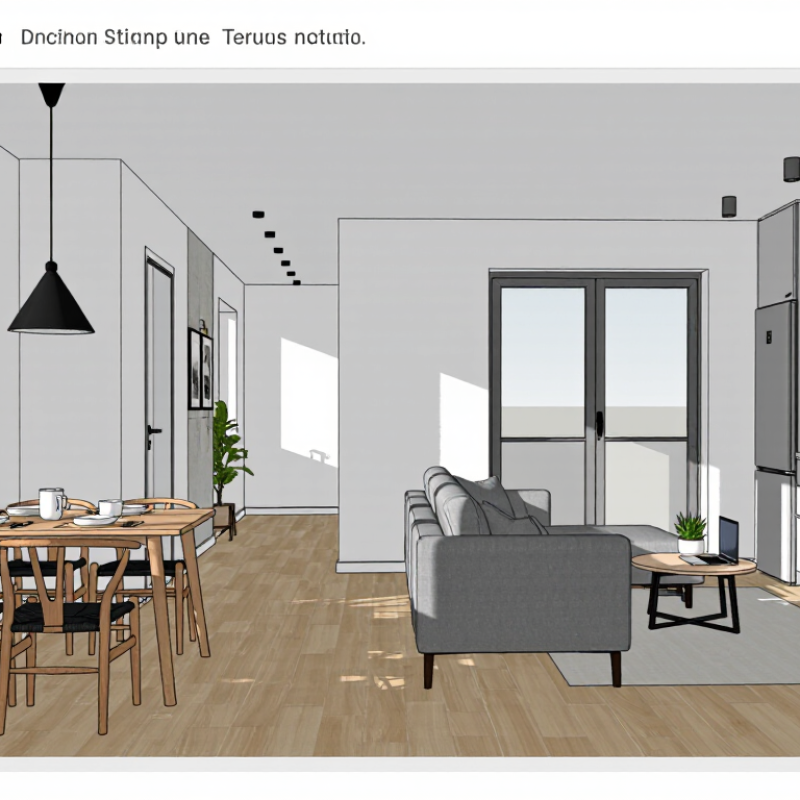
Buyers rarely respond to technical perfection alone. They respond to believable spaces, clear layouts, and the feeling of standing inside a future home. That is why Sketch Up Renders must do more than display walls, windows, and furniture. They should explain how a room works at first glance.

Alex Schreyer, an architectural designer and SketchUp educator, has often reminded users, “SketchUp is not a rendering program; it is a modeling program.” That distinction matters. Strong images begin with accurate proportions, clean geometry, and thoughtful camera placement. A polished material cannot rescue a distorted doorway or a floating cabinet. Sometimes, the model looks attractive but still feels strangely empty. That discomfort deserves attention.

This guide presents ten practical tips for creating Sketch Up Renders that support buyer decisions. You will see how daylight can reveal a narrow hallway, how furniture scale can clarify circulation, and how small details can make a kitchen feel usable. A coffee cup near a window may suggest routine. A soft shadow beneath a sofa can anchor the room. These choices should remain intentional, not decorative noise.

Experience also teaches restraint. Too much gloss can make surfaces look artificial. Excessive wide-angle views can make rooms feel larger than they are. That may attract attention briefly, but it can weaken trust later. Better Sketch Up Renders balance aspiration with accuracy. They invite buyers to imagine living there, while still respecting what the design can realistically deliver. That balance is not always easy. It requires testing, comparison, and occasional revision.
10 Tips for Better Sketch Up Renders for Buyers

Define Buyer Goals Using NAR’s 81% Visualization Finding

A widely cited industry finding reports that 81% of buyers find property visualization helpful during their search.

This matters because buyers rarely study drawings like architects. They imagine daily life instead. A strong render should answer practical questions:

  • Where will morning light fall?
  • Can a sofa fit beside the window?
  • Will the kitchen feel crowded?

Before creating a 3D sketch render, define the buyer’s goal. Families may need visible storage, safe walking space, and a flexible bedroom. Investors may focus on durability, rental appeal, and efficient layouts. Ask what decision the image must support. Then choose camera height, lighting, furniture, and materials around that decision. Keep details believable, such as a 90-centimeter walkway or a small lamp on a bedside table.

Do not polish every surface until it looks unreal.

Buyers may distrust flawless rooms. Slight material variation, natural shadows, and modest styling often create more confidence. I have seen renders fail because they showed beauty without scale. A large island looked useful, but blocked the main path. That mistake deserves review.

Check every image from a buyer’s eye level. Add a chair, doorway, or person-sized object for reference. Then test the render with someone unfamiliar with the plan. If they ask basic questions, the image still needs clearer visual evidence.

Model Accurate Geometry and Verify Scale Before Adding Detail

Better SketchUp Renders for Buyers

Accurate geometry is the quiet foundation of a convincing buyer render. I begin with a measured plan, then check wall lengths, ceiling heights, door swings, and window positions. A five-centimeter error can distort furniture spacing and daylight. It can also make a compact room appear uncomfortably large.

Scale comes before detail. I place a known reference, such as a standard doorway or dining table, before modeling cabinets or decorative objects. The 2024 Profile of Home Buyers and Sellers reports that 83% of buyers’ agents believe staging helps buyers imagine a property as their future home. That visual confidence depends on believable proportions, not excessive decoration. Buyers notice when a sofa blocks circulation or a pendant hangs too low.

I also compare the model against site photographs and measured drawings from several viewpoints. The 2024 report states that 96% of buyers use online tools during their search, so small visual errors can travel far before anyone visits. I still miss details sometimes. A kitchen island once looked correct from one camera, but failed from the entrance. That mistake changed my checking process. I now test eye-level views, walking paths, and furniture clearances before adding materials, plants, or polished lighting. Less detail, but greater trust.

10 Tips for Better Sketch Up Renders for Buyers - Model Accurate Geometry and Verify Scale Before Adding Detail

No. Rendering Tip Recommended Practice Verification Method Useful Benchmark Buyer Benefit
1 Model accurate geometry first Create walls, openings, floors, roofs, cabinetry, and major fixtures at their intended physical dimensions before adding decorative details. Measure key elements with the Dimension tool and compare them with the project drawings or site measurements. Keep major modeled dimensions within approximately ±10 mm of the approved design information unless a different tolerance is specified. Prevents misleading proportions and makes room sizes easier to understand.
2 Verify scale before adding detail Confirm the model unit, overall floor dimensions, ceiling height, door widths, and furniture scale before detailing materials or accessories. Check at least five control dimensions distributed across the model rather than relying on a single measurement. Use one consistent unit system and correct any scale discrepancy before continuing. Ensures furniture, people, doors, and finishes look believable in relation to one another.
3 Use a clear camera height Set the camera near a natural standing eye level for interior views and avoid extreme low or high angles that distort the space. Compare the horizon line with typical eye-level references and inspect vertical edges for unwanted convergence. A camera height of roughly 1.5–1.7 m is suitable for many interior buyer views, adjusted for the design intent. Creates a familiar viewpoint that helps buyers judge room proportions.
4 Choose a moderate field of view Frame enough of the room to show circulation and key features without making walls, furniture, or countertops appear unnaturally stretched. Review the image for visibly enlarged foreground objects and excessive distortion near the edges. A horizontal field of view around 60°–75° often works well for many interior presentation images. Shows spatial relationships clearly while preserving believable proportions.
5 Keep vertical lines controlled Use a two-point perspective or vertical-line correction when presenting architecture and interiors. Check door jambs, cabinets, window frames, and wall corners at the left and right edges of the image. Vertical architectural edges should appear straight unless a deliberate perspective effect is required. Makes the render feel more professional and reduces confusion about the building form.
6 Prioritize natural light direction Match the sun direction, window orientation, and intended time of day so the render communicates how the space may actually feel. Confirm that shadows fall consistently and that windows are brighter than interior surfaces when daylight is the main source. Use one dominant light direction and avoid competing shadows from unexplained sources. Helps buyers understand orientation, brightness, and the likely atmosphere of the space.
7 Use physically plausible material scale Set realistic dimensions for tile joints, wood planks, stone patterns, fabric weaves, and other repeating textures. Compare repeated patterns with nearby objects such as doors, chairs, or countertops to detect oversized or undersized textures. Align texture scale with the actual product or specification rather than stretching one image across every surface. Makes finish selections more credible and easier to evaluate.
8 Show circulation and clearances Leave visible walking paths and demonstrate how doors, drawers, appliances, and seating areas operate within the room. Inspect door swings, cabinet openings, furniture spacing, and primary routes from the camera position. Use project-specific accessibility requirements; as a general check, avoid visibly blocked primary routes and cramped door approaches. Allows buyers to judge practical usability, not just appearance.
9 Add scale references selectively Include familiar objects such as chairs, tables, doors, plants, or people only where they clarify size without distracting from the design. Check that every reference object is proportionate to the verified architecture and is not oversized for emphasis. Use a consistent human scale and avoid mixing objects from incompatible dimensional standards. Gives buyers an immediate sense of room size and furniture fit.
10 Render a consistent buyer-focused set Use a small group of views that covers the entry, main living area, kitchen or focal feature, circulation, and an exterior context when relevant. Compare views for consistent geometry, camera height, materials, lighting direction, and furniture placement. Prepare approximately 4–8 complementary views, with each image answering a distinct buyer question. Creates a coherent visual story and reduces uncertainty before a buyer makes a decision.

Note: Benchmarks are practical visualization guidelines; always follow the approved drawings, site measurements, accessibility requirements, and project-specific tolerances.

Frame Key Selling Points With Clear, Buyer-Focused Camera Views

A strong architectural render should answer a buyer’s first question: “How will this space feel to live in?” I begin with accurate site measurements, room proportions, and verified furniture dimensions. Then I choose camera positions that reflect real movement through the property. Eye-level views usually feel more trustworthy than dramatic, low-angle shots.

Frame one clear selling point in each image. A wide living-room view can show daylight, circulation, and the connection to an outdoor area. A closer kitchen view should reveal storage, work surfaces, and practical distances. Keep visual clutter low. Show the light. Do not hide awkward corners with excessive cropping.

Camera height matters more than many beginners expect. A slightly elevated view can explain a compact layout, while a lower view may make ceilings feel more generous. However, extreme perspectives often create false impressions. Buyers notice when doors, counters, or furniture look unusually large. Keep it honest. I once favored a dramatic angle that made a room appear deeper than it was, and the image felt impressive but unreliable.

Use consistent lighting across the set, so buyers can compare rooms without guessing. Add subtle material variation to walls, flooring, and joinery, but avoid glossy surfaces that distract from the layout. Before delivery, inspect every frame at full size. Check reflections, object scale, and whether the main feature is immediately visible. A beautiful render can still fail if the camera explains nothing.

Balance Materials and Lighting for Realistic Spatial Readability

10 Tips for Better Sketch Up Renders for Buyers

Balance Materials and Lighting for Realistic Spatial Readability

Buyers need to understand space before admiring style. The 2023 Profile of Home Buyers and Sellers reports that 81% of buyers’ agents find staging helpful for visualizing a property. A strong SketchUp render should work similarly. It should explain movement, scale, and atmosphere. Tip: Build one believable lighting story. Use soft daylight near windows, darker corners, and restrained artificial light. Avoid making every surface equally bright. Real rooms have gradients, reflections, and quiet areas. I still overbrighten kitchens sometimes. The image looks attractive, but the room loses depth.

Material balance matters as much as lighting. Pair reflective stone with muted wood, matte paint, and gently textured fabric. Keep roughness values varied, but not exaggerated. A glossy floor can clarify a window direction, yet excessive reflection becomes visual noise. The International Energy Agency reports that lighting uses about 15% of global electricity, reminding designers that light has practical weight, not only decorative value. Tip: Test materials beside a human-scale object. A cabinet handle, chair edge, or floorboard can reveal incorrect proportions quickly.

Tip: Make two versions before delivery. One should show realistic daylight. The other should show a warmer evening mood. Compare readability at thumbnail size. If the doorway disappears, fix contrast before adding decoration. Buyers may forgive an imperfect cushion. They will not forgive a confusing circulation path. Some shadows may look slightly too strong, and that is worth questioning. Perfect polish can hide weak spatial decisions. Recheck the camera height, lens angle, and window exposure before export.

Add Context and Run a Final QA Check Using NAR’s 23% Time-Saving Data

A strong sketch render should help buyers imagine daily life, not merely admire clean geometry. Add context with a dining table, window views, warm lighting, and realistic room proportions. Show where shoes, groceries, or a child’s backpack might sit. These details make an unfinished space feel usable.

A housing-industry study reported that a careful visual workflow can save up to 23% of preparation time. That advantage appears when teams reuse tested scene settings and review renders before delivery. Keep materials consistent. Check whether wood grain follows the floor direction, and confirm that daylight matches the stated room orientation. Buyers notice visual contradictions quickly.

Run a final quality check at full viewing size. Inspect blurred edges, floating furniture, missing fixtures, strange reflections, and unreadable labels. Compare every image with the floor plan. A render may look attractive while showing an inaccurate doorway. I have made that mistake before. It passed a quick screen review, but the wrong door swing changed the buyer’s understanding. Slow down for five minutes. Ask another person to inspect the images without design assumptions. Fresh eyes often catch scale problems, harsh shadows, or context that feels too staged. Keep one imperfect detail if it reflects the real property, but correct anything that could mislead.

Better SketchUp Renders: Reported Time-Saving Impact

Adding clear context and completing a final quality-assurance check can help make architectural renders easier for buyers to understand and review. The chart highlights the reported 23% time-saving figure referenced in the article brief; the remaining 77% represents the comparative time baseline.

Name(required)

Message(required)

VISIT US

GuangZhou

Room 2301, building A, poly zhongyu plaza, no. 626 tianhe north road, guangzhou, China

Phone/WhatsApp

+86 13392497798

Email

lights@chinarendering.com