

Inquiry
Form loading...
conatctz48
contact US

Why Is 3D Model Rendering Important?

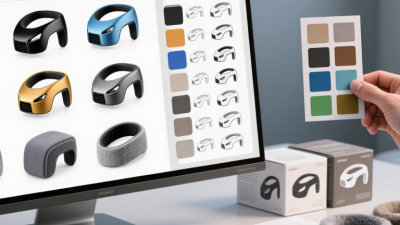
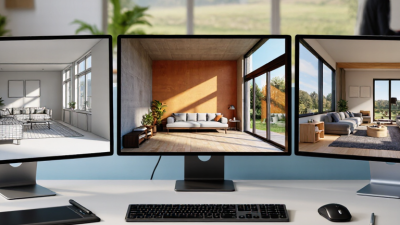
A chair may look balanced in a sketch, yet feel bulky when placed beside a real desk. 3d Model Rendering helps designers examine that difference before production or construction begins. It turns digital geometry into images that show shape, surface, lighting, and scale. A brushed metal handle can catch a narrow strip of light; a glass wall can reveal how daylight travels through a room. These details help teams discuss a design using something more concrete than a flat drawing.

The value is practical. Product teams can compare colors and materials, while architects can review room layouts and sightlines. A client can inspect a kitchen from several angles and notice that an island blocks the path to a doorway. That matters. Clear visual feedback can support better decisions, reduce avoidable revisions, and make presentations easier to understand. The results still depend on accurate models, thoughtful lighting, and realistic materials. A beautiful image is not proof that a product will work exactly as shown. Renderings can simplify manufacturing constraints, surface behavior, or real-world lighting, so they should be checked against technical plans and physical samples when needed.

Good rendering is not just decoration. It is a way to test ideas, communicate choices, and spot questions early. Yet it can also create false confidence. That tension is worth remembering as we explore why 3D visualization matters across design, architecture, and product development.

Why Is 3D Model Rendering Important?

What 3D Model Rendering Does

Why Is 3D Model Rendering Important?

What 3D Model Rendering Does

3D rendering converts a digital model into a lifelike image or animation. It combines geometry, materials, lighting, and camera angles to show how a design may look before it exists physically. A viewer can inspect the grain of a wooden cabinet, the shadow beneath a balcony, or how daylight reaches a room. Small details become easier to discuss.

That clarity can support better decisions. Teams can compare finishes, adjust proportions, and spot visual problems before production or construction. A 2023 industry analysis, “Digital twins: The art of the possible in product development and beyond,” reported gains of up to 10% in performance, 50% faster time to market, and 25% higher productivity. These figures relate to broader digital-twin programs, not rendering alone. Still, they show the value of connected digital models. Not magic. A render can look convincing while hiding practical limits, such as awkward access or a material that behaves differently in real light. I’ve seen that gap matter: a beautiful image is useful, but a careful review of the underlying model matters more.


How Rendering Turns Digital Models into Visuals

A 3D model stores shape, scale, and materials, but it does not yet show how a space will feel. Rendering translates that data into an image by calculating light, shadows, surface texture, and perspective. A window can cast a pale rectangle across a timber floor; a rough stone wall can look almost touchable. These details help clients judge proportions and finishes before construction or production begins. They also expose problems: a glossy surface may hide an awkward shape, while dramatic lighting can make a cramped room seem larger.

The National Association of REALTORS’ 2023 Profile of Home Staging found that 81% of buyers’ agents said staging helped buyers visualize a property as their future home. Staging is not the same as 3D rendering, but the finding points to the value of making spaces easier to imagine. The Stanford Web Credibility Project reported that 46.1% of participants’ credibility comments related to a site’s visual design. That study concerned websites, not models, so it should not be treated as direct proof about rendering. Still, visual choices influence judgment. A useful render should show believable materials and lighting, not just polish. Sometimes it gets things wrong. That is worth noticing.

Why Is 3D Model Rendering Important? - How Rendering Turns Digital Models into Visuals
Rendering Element What It Does What Becomes Visible Why It Matters Typical Consideration
Geometry and camera Uses the model’s shapes and a selected viewpoint to form the scene. Object proportions, silhouette, position, and spatial relationships. Helps viewers understand the model’s form and see it from a useful angle. A camera view can hide details, so important features may need additional views.
Materials and textures Assigns surface properties such as color, roughness, and texture patterns. Differences between surfaces, including whether they look matte, glossy, smooth, or patterned. Makes a model easier to interpret by showing how its surfaces are intended to appear. Material appearance depends on both the surface settings and the scene lighting.
Lighting and shading Calculates how light interacts with surfaces in the scene. Highlights, shadows, depth cues, and changes in brightness across a surface. Adds visual depth and helps distinguish the shape and placement of objects. Lighting that is too dim or too strong can obscure surface details.
Rasterization Projects model surfaces onto pixels and shades those pixels to create an image. A rendered view of the model, often produced quickly enough for interactive use. Supports responsive previews and real-time applications such as interactive 3D viewers. Speed and image quality depend on the scene, hardware, and rendering settings.
Ray tracing Simulates the paths of rays to calculate effects such as reflections and shadows. Reflections, shadowing, and other light interactions that can be difficult to approximate with simpler techniques. Can make lighting and reflective surfaces more visually convincing. It can require more computing resources than simpler rendering approaches.
Path tracing Uses repeated light-path sampling to estimate how light is distributed through a scene. Complex indirect lighting, soft shadows, and light bouncing between surfaces. Can produce realistic-looking final images for presentation and visualization. Sampling may introduce visible noise, which can be reduced with more computation or denoising.
Final image and composition Combines the camera view, materials, lighting, and rendering settings into an image. A shareable visual such as a still image, animation frame, or product view. Lets people review and communicate a design without needing to inspect the underlying 3D scene. The image communicates only what is shown; labels, multiple views, or context may be needed.

Where Rendering Fits in the Design Process

Rendering fits between the design idea and the decisions people must approve. Early in a project, a simple view of a room can expose awkward circulation, blocked sightlines, or a window that clashes with cabinetry. Later, detailed materials and lighting help teams judge how those choices work together. It is not just a final polish. It is a way to test design intent while changes are still manageable.

The timing matters. McKinsey Global Institute’s 2017 report, Reinventing Construction, found that construction labor productivity had grown about 1% annually over two decades, compared with 3.6% in manufacturing. Rendering alone cannot fix that gap. But sharing a clear visual before drawings are finalized can help clients and specialists spot misunderstandings earlier, rather than debating them beside a busy set of plans. That matters.

A useful workflow starts with a rough model, not a perfect image. Render key views when layout, scale, and major finishes are stable enough to review. Ask focused questions: Can a person pass behind the dining chair? Does afternoon light make the worktop too reflective? Then revise the model and record what changed. I still treat a render as a question, not an answer. A convincing image can hide a weak assumption, so check dimensions, material samples, and technical drawings before decisions become fixed.

How Rendering Supports Evaluation and Communication

Why Is 3D Model Rendering Important?

A rendering turns a digital model into a view people can inspect. It shows how shape, surface, lighting, and scale work together before an object is built. A designer can compare two handle shapes, spot a shadow hiding an edge, or notice that a glossy finish makes a surface look uneven. Small details count. These visual checks support practical decisions, but only when the model and materials are set up carefully. A convincing image can still hide a weak assumption about dimensions or real-world lighting.

Rendering also gives teams a shared reference. A clear view from several angles can help a client, engineer, and fabricator discuss the same feature without relying on different mental pictures. Labels, close-up views, and simple lighting choices can direct attention to a joint, opening, or color boundary. That matters. Images may support feedback, but they do not replace measurements, material samples, or physical testing. If a surface response is uncertain, it is better to say so than to present the image as proof. I have found that one honest caveat can prevent a polished picture from creating the wrong expectation.

What Determines the Value of a Rendered Image

Why Is 3D Model Rendering Important?

What Determines the Value of a Rendered Image

A rendered image is valuable when it helps viewers understand a model clearly and make a sound decision. Accuracy matters: proportions, surface details, and material behavior should match the intended design. A brushed metal finish, for example, needs controlled highlights, not a flat gray surface. Lighting also shapes perception. A soft shadow can reveal a chair’s form, while harsh glare may hide its texture. Composition counts, too. If the main object is crowded by props, viewers may miss the feature that matters most. Pretty is not enough.

The image’s purpose determines which details deserve attention. A catalog image may need a clean background and consistent color, while a design review may benefit from visible joints or a close-up of a tricky connection. Resolution, camera angle, and file format affect whether those details remain useful on screen or in print. More detail is not always better. Excessive sharpening can make edges look artificial, and dramatic lighting can suggest materials behave differently than they do. A careful review should compare the render with reference measurements, material samples, or the intended scene. Even then, judgment is imperfect; a convincing image can still leave important questions unanswered.

Name(required)

Message(required)

VISIT US

GuangZhou

Room 2301, building A, poly zhongyu plaza, no. 626 tianhe north road, guangzhou, China

Phone/WhatsApp

+86 13392497798

Email

lights@chinarendering.com